Define the page once.
Organise applications within a project. Give each page a library of named elements and locators, then reuse those references in page actions, journeys and routines.
OMEGA STUDIO / VISUAL TEST AUTOMATION
Turn pages, elements and reusable actions into connected browser tests. Arrange the pieces visually, publish a fixed test plan, then follow real Playwright results.
Created and owned by PhonicVibe.
Web application · Account and project access required.
Build visuallyDrag, connect and configure
Run with PlaywrightLocal companion or Docker agents
Keep source pinnedPublished revisions and run history
FROM SHARED OBJECTS TO ACTUAL RESULTS
Keep test intent readable.
Reuse the details behind each action.
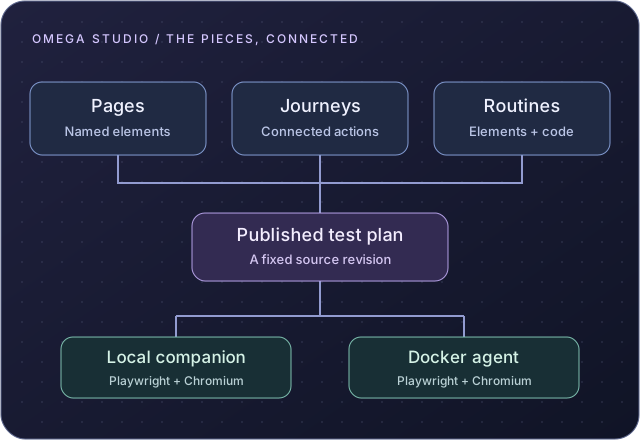
Organise applications within a project. Give each page a library of named elements and locators, then reuse those references in page actions, journeys and routines.
Drag pages, actions and routines into a node graph. Slot pieces into a connected path, configure their properties and see the order your browser test will follow. Keyboard controls offer another way to build.
Reuse element actions, trusted JavaScript, or a mixture of both. Technical authors can put custom behaviour behind a named routine for others to include in their tests.
Group pages, journeys and routines into a test plan. Publishing validates their references and pins a revision of the definitions. Later authoring changes leave that published source intact.
Run headless Chromium with the local companion, or queue independent tests for registered Docker agents. Available agents claim work over outbound HTTPS; the hosted application coordinates the run.
Start immediately or choose a future start time for the Docker queue. Follow execution status and reported steps, then download available screenshots, Playwright traces and source artifacts.
A SHARED PROJECT. A CLEAR HISTORY.
Administrators manage accounts and project access. Editors maintain the objects and plans; viewers can inspect the project. Versioned sharing lets permitted projects install independent copies of reusable definitions.
Omega Studio is created and owned by PhonicVibe, and uses Playwright, the open-source browser automation engine.
Ask about Omega StudioSign in at omegastudio.phonicvibe.com with an account assigned by your administrator. The current execution engine runs headless Chromium; Docker scheduling selects a single start time. Agent availability and the application under test determine when work can complete.
Graph validation checks structure and references. A passing browser result comes from an actual execution, not from arranging the pieces.